
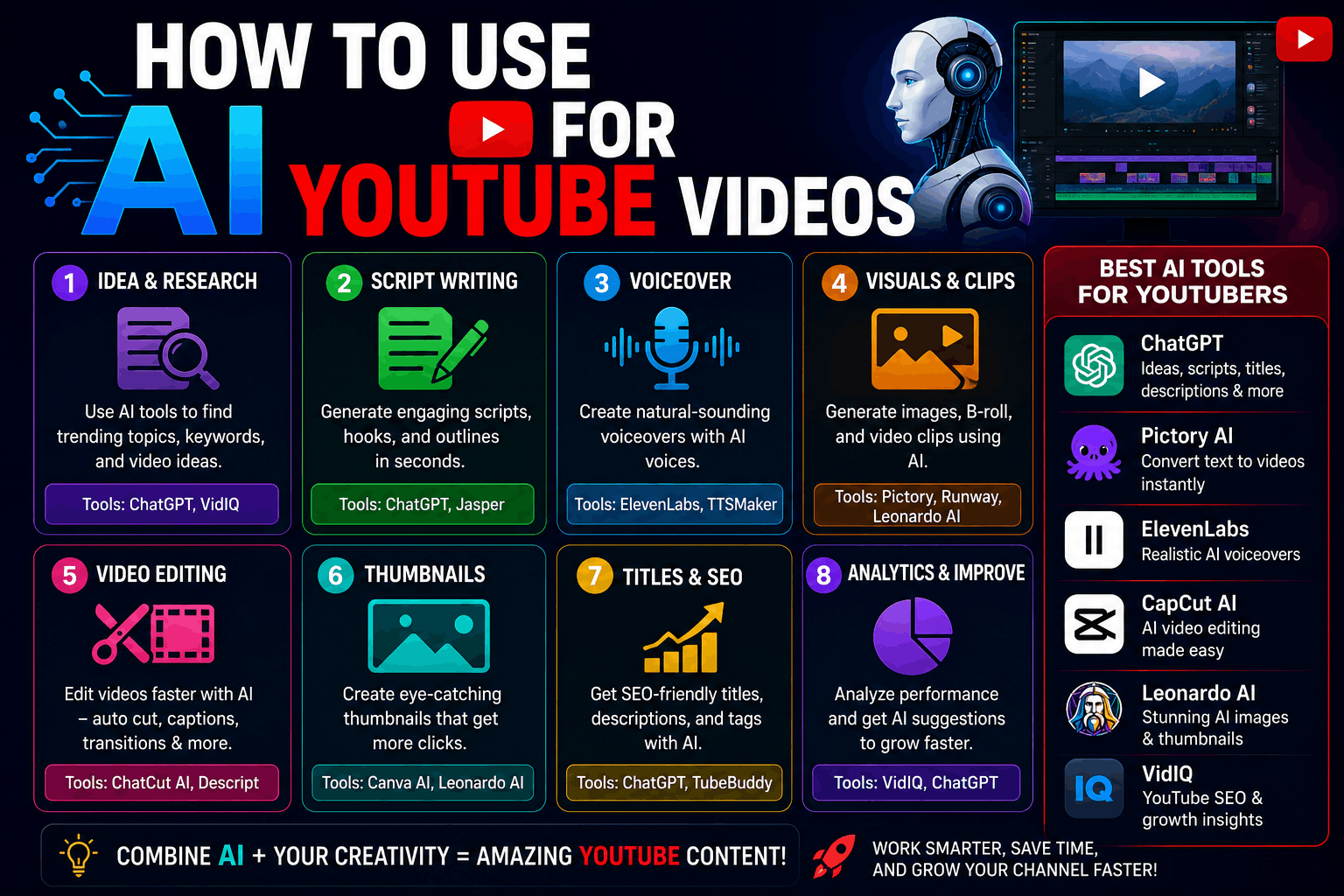
The first time I tried making YouTube videos seriously, I underestimated how exhausting the process could get.
I thought the hard part would be recording videos.
Wrong.
The real struggle was everything around it:
- Thinking of video ideas
- Writing scripts
- Editing clips
- Designing thumbnails
- Creating captions
- Finding background music
- Fixing awkward pauses
After uploading a few videos, I started understanding why so many people quit YouTube early. Even short videos can take hours to make.
That’s around the time I started experimenting with AI tools.
At first, I expected low-quality shortcuts that would make content look fake. Some tools actually did exactly that. But after testing different platforms properly, I realized AI works best as a time-saving assistant — not a replacement for creativity.
Now I use AI in different parts of the YouTube process almost every week, especially for:
- Script ideas
- Voiceovers
- Thumbnails
- Video editing
- Captions
- Research
If you’re trying to grow a YouTube channel or simply make content faster, here’s what actually works from real experience.
The Biggest Myth About AI YouTube Channels
A lot of people online make it sound like AI can fully automate successful YouTube channels.
Technically, yes — you can automate many things.
But fully AI-generated videos often feel empty.
You’ve probably seen them:
- Robotic voice
- Generic script
- Random stock footage
- No personality
People click away quickly.
The channels that actually perform well usually mix:
- AI tools
- Human editing
- Real ideas
- Good storytelling
That balance matters a lot.
How AI Helps the Most on YouTube
The biggest benefit isn’t “doing everything automatically.”
It’s reducing repetitive work.
Instead of spending 5 hours stuck on small tasks, AI helps speed up the boring parts so you can focus more on creativity.
That’s the real advantage.
1. Using AI for YouTube Video Ideas
This is honestly one of my favorite uses.
Every creator eventually runs into idea burnout.
You sit there staring at the screen thinking:
“What do I even upload now?”
I use ChatGPT a lot for brainstorming.
Example Prompt
“Give me 20 YouTube video ideas for a beginner tech channel focused on AI tools and productivity.”
The first time I tried this, the ideas were average because my prompt was vague.
Specific prompts improve results massively.
For example:
- Mention your niche
- Mention your audience
- Mention platform type
- Mention video length
That changes everything.
2. Writing YouTube Scripts With AI
This is where AI saves me the most time.
I don’t fully copy AI-generated scripts anymore because early on they sounded robotic and repetitive.
Instead, I use AI for:
- Outlines
- Hooks
- Structure
- Bullet points
- Rewriting awkward sections
My Current Workflow
Step 1
Ask AI for topic structure.
Step 2
Generate rough script ideas.
Step 3
Rewrite parts naturally in my own style.
Step 4
Add personal experiences and examples.
That final step matters a lot.
Without personal touches, scripts feel lifeless.
3. AI Voiceovers for Videos
I was honestly skeptical about AI voices initially.
Most older AI voiceovers sounded terrible.
Then I tested ElevenLabs.
The difference shocked me.
Some voices sound surprisingly realistic now.
What AI Voiceovers Are Good For
- Faceless channels
- Tutorials
- Educational videos
- Short-form content
- Explainer videos
Important Lesson I Learned
The script matters more than the voice.
Even expensive AI voices sound awkward if:
- Sentences are too long
- Tone feels unnatural
- Pacing is weird
Short, conversational sentences work best.
4. AI Video Editing Tools
Editing used to be my least favorite part of YouTube.
Especially repetitive tasks like:
- Removing silence
- Adding captions
- Resizing clips
- Cleaning audio
AI tools speed this up dramatically now.
Tools I Tested
What Surprised Me Most
Auto captions.
Years ago, adding subtitles manually was painfully slow.
Now AI can generate captions in minutes.
Still not perfect, though.
Always check spelling because AI subtitles sometimes misunderstand words completely.
I once uploaded captions where AI turned:
“AI tools”
into:
“eye tools”
Not ideal.
5. Creating YouTube Thumbnails With AI
This changed my workflow massively.
I used to spend ages trying to make thumbnails look professional.
Now I combine:
- AI image generators
- Canva
- Manual editing
Helpful Tools
Real Experience
AI-generated thumbnails look impressive initially, but fully AI thumbnails sometimes feel too fake.
The best results usually happen when you:
- Generate concepts with AI
- Edit manually afterward
That combination feels more authentic.
6. Using AI for YouTube Shorts
AI tools are incredibly useful for Shorts because speed matters.
I’ve tested workflows where AI helps create:
- Hooks
- Captions
- Voiceovers
- Quick edits
- Thumbnail ideas
Why AI Works Well for Shorts
Short-form content moves fast.
You don’t want to spend 10 hours editing a 30-second clip.
AI helps speed up repetitive editing dramatically.
7. AI for YouTube SEO
This is another area where AI helps surprisingly well.
I use AI to brainstorm:
- Titles
- Descriptions
- Tags
- Video ideas
Example Prompt
“Write 10 clickable YouTube titles for a video about free AI websites.”
The trick is editing the titles afterward.
AI sometimes creates overly dramatic clickbait titles that feel fake.
Balance matters.
8. AI Background Music and Audio Tools
Finding copyright-safe music used to be annoying.
Now AI music tools exist too.
Tools Worth Trying
You can generate background music based on:
- Mood
- Genre
- Video style
Pretty useful for creators who struggle finding music.
9. AI Image and Video Generation
This part feels almost futuristic sometimes.
AI tools can now generate:
- Backgrounds
- Animations
- Characters
- B-roll visuals
Useful Platforms
Honest Reality
AI video generation still isn’t perfect.
Some generated clips look incredible.
Others look strange and glitchy.
It’s improving fast though.
Step-by-Step Beginner AI YouTube Workflow
If I were starting from zero again, here’s honestly what I’d do.
Step 1: Choose a Simple Niche
Start with topics you actually enjoy.
Examples:
- Tech
- Gaming
- Productivity
- Tutorials
- Motivation
- AI tools
Step 2: Use AI for Brainstorming
Ask ChatGPT for:
- Video ideas
- Hooks
- Script structures
Don’t copy everything directly.
Use it as assistance.
Step 3: Create Script Outline
Keep scripts conversational.
Avoid sounding overly formal.
Short sentences usually sound better on YouTube.
Step 4: Record or Use AI Voice
If you’re camera shy, AI voiceovers can help initially.
But natural human voices still connect better emotionally.
Step 5: Edit With AI Tools
Use:
- CapCut
- Descript
- Runway
to speed up editing.
Step 6: Create Thumbnail
Use AI generators for ideas.
Then improve manually in Canva.
Step 7: Upload Consistently
This matters more than most people expect.
One average video every week is better than one “perfect” video every three months.
Common Mistakes Beginners Make
Relying Too Much on AI
This creates generic content quickly.
AI should support creativity, not replace it.
Using Robotic Scripts
YouTube viewers instantly notice unnatural speech patterns.
Read scripts out loud before recording.
If it sounds weird verbally, rewrite it.
Ignoring Storytelling
Fancy editing can’t fix boring videos.
People stay for:
- Personality
- Curiosity
- Entertainment
- Value
Overcomplicating Equipment
You don’t need:
- Expensive camera
- Studio lighting
- Fancy setup
A phone, decent audio, and useful content are enough to start.
What Actually Helped My Videos Improve
Surprisingly, AI wasn’t the biggest reason videos improved.
Consistency was.
AI simply reduced friction.
Instead of wasting hours:
- Thinking of titles
- Editing captions
- Fixing scripts
- Designing thumbnails
I could focus more on:
- Better ideas
- Better pacing
- Better storytelling
That’s where AI genuinely becomes useful for YouTube creators.
Not as a magic button.
But as a creative assistant that helps you move faster without getting stuck on repetitive work all the time.
