
The first website I ever tried to build looked terrible.
I spent hours changing fonts, dragging sections around, watching random tutorials, and still ended up with a homepage that looked broken on mobile. The menu didn’t work properly, images loaded slowly, and I accidentally deleted the header three different times.
At one point, I honestly thought website creation was only for professional developers.
Then AI website tools started getting better.
Instead of manually designing every section from scratch, I began testing AI-powered builders that could generate layouts, write content ideas, suggest colors, and even create images automatically. Some tools were surprisingly useful. Others created websites that looked nice at first but became messy once real content was added.
After building blogs, landing pages, and small online stores with AI tools, I realized something important:
AI can save a huge amount of time, but you still need basic direction and good decisions.
If you want to create a website without learning complex coding, AI tools can make the process much easier than it used to be.
Here’s what actually worked for me.
What AI Can Really Do for Website Creation
A lot of people think AI builds a perfect website instantly with one click.
Not exactly.
AI tools can help with:
- Website layouts
- Design suggestions
- Writing content drafts
- Generating images
- Creating logos
- Improving SEO basics
- Mobile optimization
But you still need to:
- Choose your niche
- Add real content
- Organize pages properly
- Customize the design
Think of AI like a fast assistant — not a magical replacement for decision-making.
Step 1: Decide What Type of Website You Want
Before touching any AI tool, I learned it’s important to know your goal first.
One mistake I made early on was trying to build:
- A blog
- An online store
- A portfolio
- A course platform
all inside one website.
It became confusing fast.
Keep It Simple Initially
Choose one clear purpose:
- Tech blog
- Portfolio
- Freelancing website
- Shopify store
- Affiliate site
- Business landing page
When your goal is clear, AI tools generate better results.
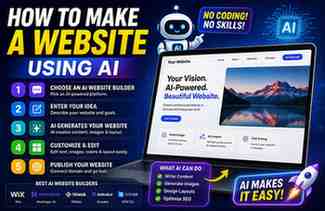
Step 2: Choose an AI Website Builder
I tested several AI website builders over time. Some felt too restrictive, while others gave better flexibility.
Here are the ones that stood out.
1. Wix
I first used Wix Official Website for a simple blog project.
Its AI setup asks questions like:
- What type of website do you want?
- What style do you prefer?
- What features do you need?
Then it generates a website automatically.
What I Liked
- Beginner-friendly
- Fast setup
- Mobile-friendly templates
- AI design suggestions
Downsides
Too much customization sometimes made pages heavy and slower.
Still great for beginners.
2. Shopify
I personally used Shopify while testing digital product stores.
Its AI features help with:
- Product descriptions
- Store setup
- Branding ideas
- Email suggestions
Best For
- Online stores
- Digital products
- Dropshipping
- Print-on-demand shops
Real Experience
The AI-generated product descriptions saved time, but I still edited them manually to sound more natural.
That extra editing matters.
3. WordPress with AI Plugins
This became my favorite option eventually.
At first, WordPress felt complicated compared to drag-and-drop builders. But once I understood it properly, the flexibility was worth it.
Using AI plugins inside WordPress helps with:
- Content writing
- SEO optimization
- Image generation
- Layout assistance
Why I Prefer It
- More control
- Better long-term scalability
- Huge plugin library
- Easier SEO improvements
Important Lesson
Cheap low-quality themes can slow websites badly.
I learned this after installing flashy themes loaded with unnecessary animations.
Step 3: Use AI to Generate Website Structure
This step saved me the most time personally.
Instead of staring at a blank page wondering what sections to add, AI tools suggested:
- Homepage structure
- Service sections
- FAQs
- About pages
- Contact sections
Basic Website Pages Most Sites Need
- Home
- About
- Contact
- Privacy Policy
- Blog or Services page
Don’t overcomplicate the first version of your website.
Simple websites often perform better.
Step 4: Create Content With AI — But Edit It Yourself
This is where many beginners make mistakes.
AI can help generate:
- Headlines
- Blog outlines
- Product descriptions
- Service explanations
But copying raw AI text directly usually feels robotic.
What Worked Better for Me
I use AI for:
- Ideas
- Drafts
- Structure
Then I rewrite content naturally.
That combination feels much more human.
Step 5: Generate Images and Graphics
Finding good visuals used to take forever.
Now AI image tools help create:
- Featured images
- Website banners
- Thumbnails
- Product mockups
- Background graphics
Tools I Personally Tested
Canva
Great for:
- Quick banners
- Social graphics
- Blog images
Leonardo AI
Useful for:
- AI-generated illustrations
- Creative backgrounds
- Tech artwork
Remove.bg
Extremely useful for:
- Product images
- Transparent graphics
Step 6: Optimize Website for Mobile Users
This is something I ignored initially.
My first website looked okay on laptop but terrible on phones.
Buttons overlapped.
Images stretched badly.
Menus looked broken.
Most visitors now come from mobile devices, so mobile optimization matters a lot.
What I Check Now
- Button size
- Font readability
- Image scaling
- Menu spacing
- Loading speed
Always test your site on:
- Android phones
- iPhones
- Tablets
before publishing.
Step 7: Improve Website Speed
AI-generated websites sometimes become bloated with:
- Large images
- Too many animations
- Heavy effects
I learned this the hard way when my homepage took almost 10 seconds to load.
What Helped
- Compress images
- Remove unnecessary plugins
- Use lightweight themes
- Avoid autoplay videos
Fast websites feel more professional.
Step 8: Add SEO Basics
AI tools help with SEO suggestions, but basic manual setup still matters.
Important SEO Elements
- Proper page titles
- Meta descriptions
- Clean headings
- Fast loading speed
- Mobile-friendly design
For blogs especially, SEO matters long term.
Real AI Website Mistakes I Made
Depending Too Much on Automation
At one point I let AI generate almost everything.
Result:
The website looked generic and lacked personality.
Using Too Many Plugins
I installed dozens of tools thinking “more features = better website.”
Wrong.
Too many plugins slowed everything.
Ignoring Design Simplicity
I used flashy animations everywhere because they looked cool.
Visitors actually preferred cleaner layouts.
Choosing Bad Hosting
This mistake caused:
- Slow loading
- Random downtime
- Frustrating performance
Even the best AI-built website struggles on weak hosting.
AI Tools That Help Beyond Website Building
These tools also improved my workflow.
ChatGPT
Useful for:
- Content ideas
- Blog outlines
- FAQs
- Headline suggestions
Grammarly
Helps fix:
- Grammar mistakes
- Awkward sentences
- Typos
Canva
Still one of the easiest tools for:
- Website graphics
- Logos
- Social banners
How Long Does It Actually Take?
This depends on your goal.
Simple Website
Can be done in:
- A few hours
- One weekend
Professional Content Website
May take:
- Weeks
- Ongoing improvements
- Continuous content creation
AI speeds things up, but building a good website still requires patience.
Is Coding Still Necessary?
Honestly, for basic websites:
No.
AI website builders and drag-and-drop platforms handle most technical work now.
But learning a little:
- HTML
- CSS
- Basic SEO
still helps long term.
Even simple knowledge gives more control.
Final Thoughts
AI website tools genuinely make website creation easier than it used to be.
A few years ago, building a decent-looking website without coding felt overwhelming. Now beginners can launch blogs, stores, and portfolios much faster using AI-assisted platforms.
But after working on real websites myself, I learned something important:
The best websites still need human decisions.
AI can:
- Save time
- Generate ideas
- Simplify setup
- Speed up design work
But your personality, niche understanding, and creativity are what make a website feel real.
Start simple.
Focus on usefulness.
Avoid overcomplicating things.
Your first website doesn’t need to look perfect.
It just needs to work well, load fast, and genuinely help visitors.
